This website contains affiliate links and we may be compensated for referrals.




This website contains affiliate links and we may be compensated for referrals.
Picture this: you’re driving down the road looking for somewhere to fill up on gas, but everywhere you look, it seems like the prices are too high. That’s where Upside (formerly GetUpside) comes in to save the day and save you some money.
Upside is an app that gives you discounts on gas, typically a few cents per gallon (often about 3 to 11 cents, depending on the station and your location). Not only are you getting discounts when you fill up, it also has cash back offers. Why pay full price at the gas pump?
Every driver benefits from this, but none more than rideshare and delivery drivers or other people whose business can be affected by rising gas prices.
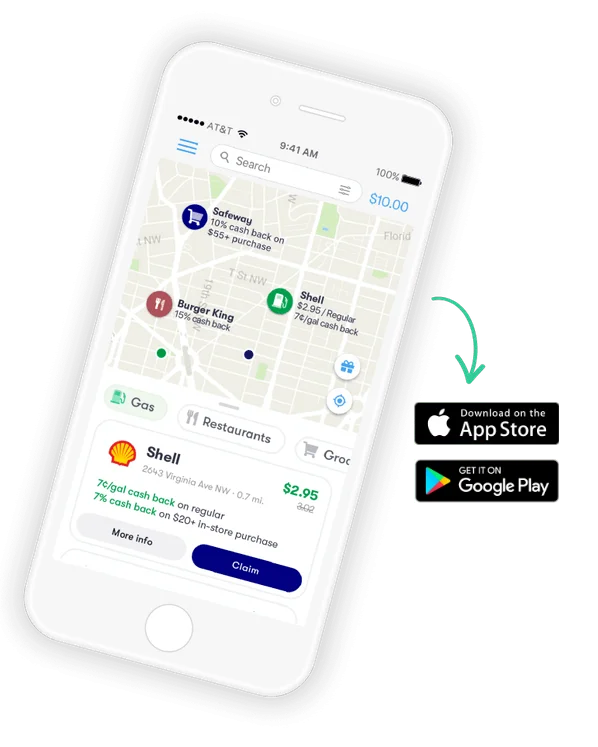
Upside partners with a wide variety of gas stations, grocery and convenience stores, and restaurants to give you cash back on the things you buy already. You open the map, filter by gas, restaurants, groceries, or all 3, see what savings are available nearby, select a business and you’re ready to go.
The first step is to download the app here.
Next, just enter the promo code RSGURU for extra savings on your first fill-up. Offer amounts change, so check the app to see what the code is worth today.
Then sign up using a Google, Facebook, Apple or email account and you’re ready to start saving.
On the main screen of Upside, it shows all the different gas stations/restaurants/grocery stores near you that can save you money and get you cash back.
Don’t forget to compare prices as well as offers, the end goal is to save money after all.
You can click on whichever gas station you want to fill up at and claim the offer. You have to be sure to check in to that place within the time limit shown in the app (it has been 4 hours) after claiming the offer. Claiming the offer means it’s time to make your purchase.
You travel to, and check in at the gas station. If there is a blue badge, you can skip the receipt. If there’s no blue badge? No problem, just scan your receipt.
Also be sure to pay with a credit or debit card. Then boom, you’re saving money! It’s so simple that anyone can enjoy the savings.
The Best Part of This App? It’s free to download and anyone can install it. It’s convenient for anyone who ever needs to fill up their tank.
It is also incredibly beneficial for Lyft and Uber drivers because of the rising gas prices. These drivers want to make money to spend on important things in their lives, they don’t want to be shelling all their earnings back into their gas.
With the discounted gas and cash back offers, it’s a no-brainer for Lyft and Uber drivers to sign up and start saving.
It’s free to download, anyone can use it, it gives you a discount on gas, and you get cash back while you use it.
Is GetUpside app legit? Uber has partnered with the Upside cash back app to help rideshare drivers save on gas. It’s a legitimate app with no scams or hidden fees associated with it.
So what are you waiting for? Sign up to start using the app today and see what promo code RSGURU earns you on your first fill-up!
| Cookie | Duration | Description |
|---|---|---|
| cookielawinfo-checkbox-analytics | 11 months | This cookie is set by GDPR Cookie Consent plugin. The cookie is used to store the user consent for the cookies in the category "Analytics". |
| cookielawinfo-checkbox-functional | 11 months | The cookie is set by GDPR cookie consent to record the user consent for the cookies in the category "Functional". |
| cookielawinfo-checkbox-necessary | 11 months | This cookie is set by GDPR Cookie Consent plugin. The cookies is used to store the user consent for the cookies in the category "Necessary". |
| cookielawinfo-checkbox-others | 11 months | This cookie is set by GDPR Cookie Consent plugin. The cookie is used to store the user consent for the cookies in the category "Other. |
| cookielawinfo-checkbox-performance | 11 months | This cookie is set by GDPR Cookie Consent plugin. The cookie is used to store the user consent for the cookies in the category "Performance". |
| viewed_cookie_policy | 11 months | The cookie is set by the GDPR Cookie Consent plugin and is used to store whether or not user has consented to the use of cookies. It does not store any personal data. |

Includes support for most common tax forms, including most 1099 forms & Schedule-C. (the forms rideshare drivers use to file). rideshareguru.com receives compensation from our affiliates. Please support us by using our link to sign uo.