Getting a Clean Up Fee from Uber or Lyft 4

Getting a Clean Up Fee from Uber or Lyft

This website contains affiliate links and we may be compensated for referrals.
So your passenger just got sick. That’s part of the territory as an Uber or Lyft driver: you’re transporting passengers late at night, and sometimes people get sick. It’s frustrating because a mess means lost time and wages. Luckily, both Lyft and Uber have processes that let you request a fee from the rider to cover cleaning.

Handling a Sick Passenger Post-Vomit

First things first, you want to make sure your passenger does not need medical attention. Ask if they’re alright, and make sure they’re conscious. Roll down your windows to increase airflow in your vehicle. If the passenger is still feeling nauseous, offer them a puke bag if you have one on hand. Alternatively, find a safe spot to pull to the side of the road to prevent any further mess inside your vehicle.

You want to make sure you get your passenger to their destination safely. After you drop off your passenger, find a well-lit area to park your car. Documenting the mess is essential if you want to receive compensation in the form of a cleaning fee.

What is an Uber/Lyft cleaning fee?

Ultimately, both Uber and Lyft will help you get reimbursed. This payment goes entirely to you, and it should be used only to clean and repair your car to get it back into operational condition. Yes, this is not a fun situation to be in, but luckily thereโ€™s a quick and easy way to work through it.

How to Report a Sick Passenger

First, record what happened and give honest feedback about the situation on the passengerโ€™s profile. It might be helpful to take a screenshot of what you wrote in case it comes up later.

After that, take multiple photos and videos of the mess. These photos need to be well-lit, even if the incident happened late at night. It may seem gross, but documenting the mess with videos and pictures is extremely important. Remember, the passenger can try to dispute the additional cost so this is a necessary step to protect yourself.

If you have a dashcamย (you should), and it was functioning at the time of the incident, you may want to consider submitting that video as well. The video may help your rideshare company identify the passenger and ensure that the claim is valid. The more information you can offer to bolster your report, the better.

Uber Cleaning Fee: Sick Passenger Report

When it is time to submit a claim directly to Uber, you’ll want to have documentation on hand. Make sure you have the following information before submitting your claim:

  • Photos of the mess
  • A cleaning receipt if you chose to use a professional service
  • A receipt for cleaning supplies purchased if you choose to clean it up yourself

    ย (Uber may deny your claim if you don’t provide a receipt, so be proactive.)

You’ll also need to offer Uber a description of events. This might include the date/time the ride started and ended, what happened during the ride, and identifying details about the passenger.ย 

Requesting a Cleaning Fee in your Uber App

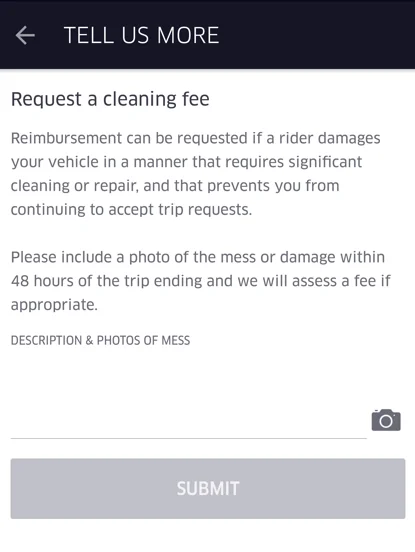
This step is time-sensitive, so submit your request as soon as you can after the trip. Uber has historically required drivers to file within a few days. Menus change, so look in the Uber Driver app under Help, find the trip in which the passenger got sick, and choose the option to request a cleaning fee. Fill out the form and submit a photo.

Be patient afterward. It may take a few days for Uber to get back to you, and they might ask for more information about what happened. In other cases, you’ll hear back within minutes.

Getting a Clean Up Fee from Uber or Lyft 2
Cleaning Fees for Uber

At the end of the day, you should be compensated for the cleaning you have to do. Uber’s support page notes that riders are responsible for vomit, beverage and food messes in your car, and Uber charges the rider accordingly. Uber’s fee breakdown scales with the mess. Minor messes start around $20, vomit and larger spills are typically $40 to $80, and significant bodily fluid messes can reach $150. Amounts have changed over time, so check Uber’s help page for current figures.

The good news is the full fee goes to the driver, so you can buy the cleaning materials you need and take care of the mess.

Lyft Cleaning Fee: Sick Passenger Report

Lyftโ€™s support site spells out what to do after a passenger vomits. Essentially, you’ll want to start by taking at least two clear photos of the mess. Then, you’ll want to have several pieces of information handy. You need the passengerโ€™s name, their pick-up location, and their drop-off destination.

Requesting a Cleaning Fee in your Lyft App

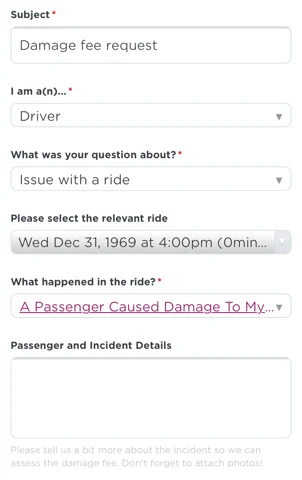
In your app, go to the Help section and follow these steps:

  • In the subject type โ€œDamage fee requestโ€
  • Select “Driver”
  • Select “Issue with a ride”
  • Choose the relevant ride
  • Select “A passenger caused damage to my vehicle”

After that, there is a box for the incident details. Make sure you fill it in completely, then attach the photos you took along with any videos of the mess or event if you have a rear-facing passenger cam.

Getting a Clean Up Fee from Uber or Lyft 3
Cleaning Fees for Lyft

Lyft handles this a little differently. Uber has a published price breakdown by type of mess, while Lyft leaves the amount to its own discretion. Lyft’s terms say the damage fee can be up to $250 depending on the extent of the damage, and drivers are asked to report promptly, with photos. As with Uber, the fee is charged to the passenger and paid to you.

Next Steps

After documenting the mess, you need to get it cleaned up. Luckily, you have a couple of options. No matter which process you choose, make sure you keep all receipts and document the cleaning efforts.

Professional Car Detailer

When a passenger vomits in your car, it’s essential to get the interior cleaned as fast as possible. One way to make this happen without cleaning it yourself is to take your car to a professional detailer. After you drop off the sick passenger, search for the nearest professional cleaner.

If you use a professional to get the interior of your car cleaned, you MUST keep the receipt in order to get reimbursed. Before you get back on the road, take a quick look at your receipt. Uber requires the receipt to have:

  • The date of the cleaning
  • The details of the car wash where the cleaning was done – name and address

You’ll need to submit this receipt while making an official sick passenger report in order to be reimbursed for the service.ย 

DIY Cleanup

The old saying is if you want something done right you need to do it yourself. Maybe that holds true in this scenario too. If youโ€™re not afraid to roll up your sleeves and clean up the mess, you might as well take care of it. This method is the quickest and cheapest. You might even get it done in enough time to continue driving.

Keeping cleaning utensils in your trunk is the best way to expedite the process.ย  Here are some popular items experienced rideshare drivers keep on hand:

Some of these items are featured in our 10 Things Every Uber Driver Needs guide. Check it out for more recommendations.

Getting a Clean Up Fee from Uber or Lyft 1
Mobile Detailing
The lesser-known method is to have the pros come to you. National Detail Pros offer an easy way to have your car cleaned right in your driveway. The app does all of the hard work for you. You use your smartphone to beckon their services and they take care of everything. All they need is your keys. Track the service on the app and donโ€™t pay until the workโ€™s done. This is a good solution if you donโ€™t have the time to spend chasing other options.

We may receive a referral fee for recommending some of the products, apps or servicesย listed on this website.ย  ย 

Scroll to Top

100% FREE |$0 for Federal | $0 for State | NO UPSELL

Includes support for most common tax forms, including most 1099 forms & Schedule-C. (the forms rideshare drivers use to file). rideshareguru.com receives compensation from our affiliates. Please support us by using our link to sign uo.

Days

LEFT TO FILE YOUR TAXES

Subscribe to get tools, updates, and news to help you earn more in rideshare.

Home 8